


3D Pixel Art Guide
posted on 10 May 2026, updated on 12 May 2026

3D Pixel Art Guide by Bernard Perbal is licensed under a Creative Commons Attribution-ShareAlike 4.0 International License.
This page presents some technical details and explanations related to my approach to creating isometric 3D pixel art, particularly the dimensions of a basic cube, inclined planes, ellipses, and colors.
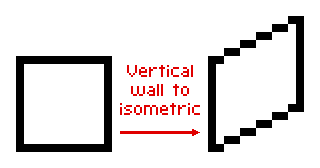
In isometric pixel art, lines are typically drawn using a stair-step pattern, where each step consists of 2 horizontal pixels for every 1 vertical pixel. This convention creates a clean, regular, and visually pleasing appearance. For example, a line spanning 10 horizontal pixels will have a vertical offset of 5 pixels.

Example: below is a vertical wall built from a 12-pixel square.
There are two types of representation for a simple object in 3D pixel art: Type A and Type B. Here is an example using a simple cube. Notice the central vertical line separating the left and right sides.
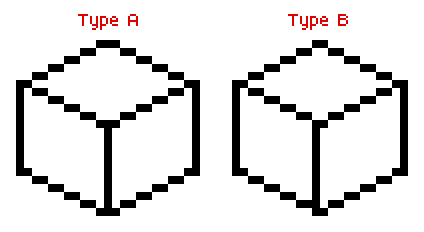
In general, Type B is preferred, as Type A can cause alignment issues on a grid due to the objects' odd-numbered width.
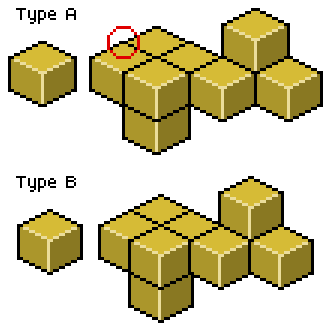
To draw a visually perfect cube, you can easily determine its height from the edge length of the square in 2D. Let's take an edge length of 2 units as an example.
Consider the following diagram. In red: 2 horizontal units for 1 vertical unit. In green: x, the edge length in isometric projection. And in black: the cube's top face viewed from above, where h represents both the edge length and the height of the cube:
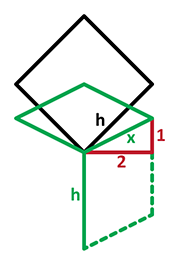
The first step is to calculate the projected edge length x in Pixel Art-style isometric projection, where the ratio is 2 horizontal pixels for every 1 vertical pixel.
This projected length is therefore:

In a top-down flat view, this length corresponds to the edge of a square rotated by 45 degrees, whose diagonal matches the cube's isometric height h. That height is:

As a result, the ratio between the isometric height h and the projected edge length x is:
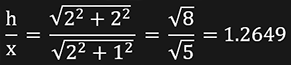
So, the ideal isometric cube height is approximately 1.2649 times the projected edge length.
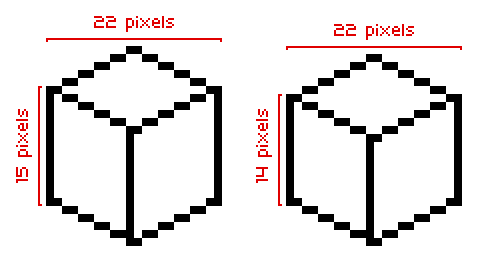
Here is an example of a cube whose edge has a horizontal component of 12 pixels. The vertical component is therefore 6 pixels. The height calculation gives: 12 * 1.2649 = 15.1788 which is rounded to 15 pixels.
However, there is an important detail to keep in mind: in a 12-pixel cube, the left side overlaps the right side by 2 pixels. As a result, the total horizontal width of the cube is 22 pixels instead of 24.
To achieve a more visually accurate cubic appearance, the height should therefore be adjusted using: 22 * 1.2649 / 2 = 13.9139 rounded to 14 pixels.